If you are a small business owner, micro retailer, f-commerce seller, or informal online seller in Bangladesh, a bKash Personal Retail Account (PRA) is designed to help you collect payments for goods and services without needing the same setup path as a larger formal merchant. Official bKash materials position PRA for micro and small businesses operating in retail and f-commerce, and the signup journey is built around fast onboarding, payment collection, and business-use transactions.
The reason this topic ranks with a mixed informational + transactional intent is simple. Searchers do not just want a definition. They want a direct answer to questions like: Can I open it without a trade license? What documents do I need? Can I use my existing NID? How fast can I start taking payments? The current SERP reflects exactly that pattern, which is why the best article structure is: answer first, then walk the reader step by step, then remove objections.
7-point summary box
- A bKash Personal Retail Account is meant for micro, small, and marginal business owners, including retail and online/f-commerce sellers.
- You can apply without a trade license if PRA is the right fit for your business.
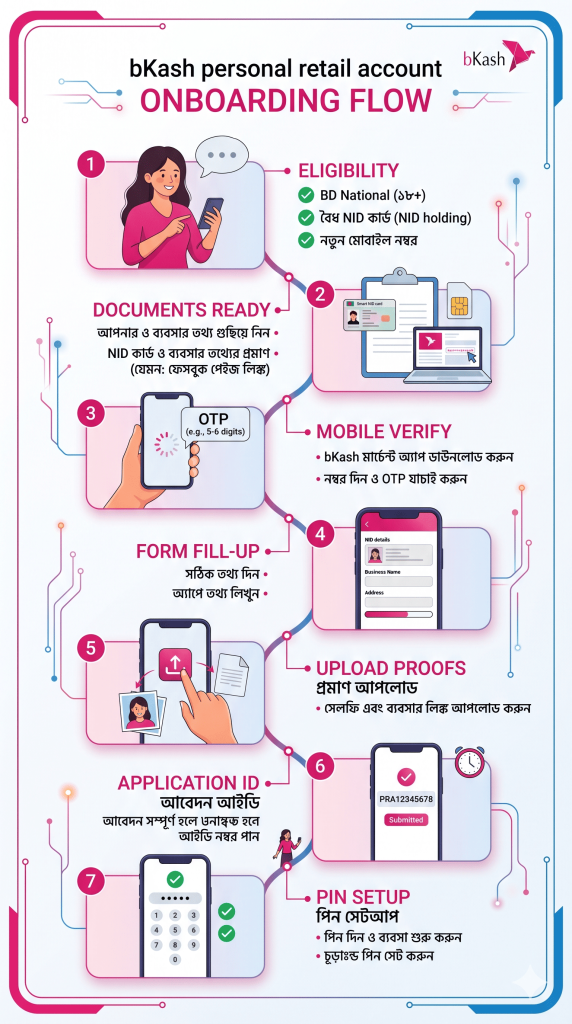
- You need a valid NID, a mobile number registered against your NID that has not been used for another bKash account, proof of SIM ownership, and a live/self photo.
- The official PRA process includes mobile verification, personal details, business details, image uploads, and final submission.
- After successful registration, you receive an application ID to track status, and once approved you can set a PIN via *247# and start using the account.
- PRA supports receiving payments, send money, cash out, merchant-to-merchant transfer, and Merchant App usage, with official limits published by bKash.
- If you already have a personal bKash account, the same NID may still be used, but the PRA must be opened with a new mobile number that has never been used to open any bKash account before.
This guide is aligned with the official bKash PRA page, official bKash business page, official help/contact information, and official limit information reviewed on April 16, 2026.
What is a bKash Personal Retail Account?
A bKash Personal Retail Account, often shortened to PRA, is a business-use account type from bKash for micro and small businesses, especially those in retail and f-commerce, so they can collect bKash payments against goods and services. In practical terms, it gives a small seller a more business-ready payment setup than a regular personal wallet, while still keeping onboarding simpler than a fully formal merchant route.
What makes PRA especially attractive for small business owners is the operating model. Official bKash materials say a PRA holder can receive payments from bKash customers, use QR or payment channels, send money, cash out through agents and approved ATMs, transfer to other PRAs and certain merchant account types, and use the bKash Merchant App. That gives a small seller a real business workflow, not just a basic wallet.
In my experience, this is the angle most articles miss. Small sellers are not searching for financial theory. They are trying to solve a daily problem: “How do I accept customer payments cleanly, keep business transactions separate, and get started without a complex formal process?” That is why the best-performing content should sound less like a fintech brochure and more like a reliable onboarding guide.
Who should open a bKash Personal Retail Account?
PRA is a strong fit for small shop owners, home-based sellers, Facebook page sellers, boutique operators, informal resellers, and micro entrepreneurs who need a business-facing payment option but may not yet have a trade license. bKash’s own business page explicitly says that if you do not have a trade license, you may open a Personal Retail Account.
The official Bengali FAQ also states that PRA registration is meant for people who are Bangladeshi citizens, aged 18 or above, hold a valid NID, and are micro, small, or marginal business owners. That matters because it helps you qualify yourself before you waste time preparing documents.
If your business is already more formal, license-based, and needs a more established merchant framework, you should also compare PRA with the standard bKash Merchant Account. Official merchant pages describe that route as a way to accept payments digitally from more than 70 million bKash users with features such as Merchant App, Merchant QR, counter payment, and transaction history.
Eligibility checklist before you begin
Before opening a PRA, make sure these points are true for you:
1. You are eligible by age and nationality
The official criteria say the applicant must be a Bangladeshi citizen, at least 18 years old, and have a valid National ID Card.
2. You are using the right type of business profile
PRA is aimed at small-scale business owners, including micro and marginal entrepreneurs. If your operation is a small retail or online-selling business, you are in the intended audience.
3. Your mobile number is fresh for PRA use
This is one of the biggest filters. Official bKash info says the mobile number used for PRA registration must be valid, registered against your NID, and must not already have a bKash account opened on it. At the same time, the same NID may still be used if you already have a personal bKash account, as long as the PRA is opened with a different unused number.
4. You can prove SIM ownership
bKash’s PRA onboarding guidance says you need proof of your mobile SIM ownership, and one official search snippet notes that a potential PRA holder may need to dial *16001# and provide the last 4 digits of the NID to receive an SMS listing the mobile numbers registered under that NID, then keep a screenshot or photo for onboarding.
Documents and assets you need
Here is the practical checklist small business owners should prepare before starting the application:
- valid National ID Card
- a mobile number registered in your own name and not previously used to open any bKash account
- proof of SIM ownership
- your live/self photo
- if applicable, nominee NID
- accurate business information
- the correct business page or group link if you run an online or social commerce business
The official Bengali PRA page also gives unusually useful quality-control advice. It says the information should match the NID, the business page name and business name should match, NID photos should be clear, the selfie should be taken with eyes open and only the applicant visible, the business page/group link should be correct, the SIM ownership screenshot should be clear, and users should not upload downloaded shop images or altered NID images.
In my experience, this is where most applications slow down. Not because the form is long, but because the supporting evidence is inconsistent. A blurred NID, a business page that does not match the stated business name, or a number that was already used in another bKash account can turn a quick application into a frustrating retry.
Step-by-step: how to open a bKash Personal Retail Account
Step 1: Decide whether PRA is the right account type
Start with account fit, not form filling. If you run a small retail or online business and do not have a trade license, bKash’s official business page points you toward the Personal Retail Account route. If your business is more formalized and closer to a standard merchant operation, compare it with the Merchant Account first.
Step 2: Use a mobile number that has never been used for another bKash account
This rule matters more than many applicants expect. Official guidance says the PRA number must be valid, registered against your NID, and not previously used to open any bKash account. The same NID can still coexist with a personal bKash account, but you cannot simply convert a personal account into a PRA, and you cannot use a number that is already tied to an existing bKash account.
Step 3: Prepare your SIM ownership proof
One official bKash search result indicates applicants may need to dial *16001# with the last 4 digits of their NID to receive an SMS listing numbers registered under that NID, then capture that as proof for onboarding. Whether you use that exact route or another current proof step shown during onboarding, the main point is the same: be ready to prove that the SIM belongs to you.
Step 4: Open the official PRA signup route
From the official bKash PRA page, use the “Open Personal Retail Account” path or the linked official registration portal. bKash’s own instructions say self-registration is available, and you do not need to visit Customer Care just to start the process.
Step 5: Agree to the terms and verify your mobile number
The official Bengali step flow says you first agree to the terms, enter the mobile number you want to register, choose your operator, and verify the number with the SMS registration verification code sent to that number. This is the gate that confirms you are applying with the correct mobile line.
Step 6: Fill in your personal information
After mobile verification, the official flow says you complete the registration form with your personal information. This is the point where your NID data consistency becomes critical. Make sure spelling, order of names, and other details match official records.
Step 7: Fill in your business information
Next, you provide your business-related details. Official onboarding guidance and signup fields indicate the process may ask for information like business name, address, contact person, phone number, email, business type, and related details depending on the route used. The Bengali guidance also stresses that the business page name and business name should match when relevant.
For small business owners, this is not a section to rush. In my experience, a clean business identity makes approval easier. If you sell through Facebook or another social channel, keep the business name consistent across your page title, form entry, and any supporting screenshots you upload.
Step 8: Upload your selfie and required screenshots or images
According to the official PRA instructions, the next step is to take your own photo and upload the required images or screenshots. The same official page warns users to keep the NID photo clear, avoid taking photos of photos, avoid dark or poor-quality live pictures, and avoid uploaded store images downloaded from elsewhere.
This is the point where a lot of “almost correct” applications fail. Use good lighting. Place the NID on a flat surface. Make sure text is readable. Do not crop too aggressively. And if the portal asks for business page or SIM proof, upload the clearest version you can.
Step 9: Submit the application and save the application ID
Once you submit, the official bKash process says you receive a congratulatory message on screen along with an application ID. Save it immediately. This is your key for checking registration status later.
Step 10: Track your registration status
The official FAQ says you can check your registration status using your mobile number and application ID through the designated status-check link from the home page. If the information matches, you can see where your application stands.
Step 11: Wait for approval, then set your PIN
The PRA page says that after bKash verifies the submitted information and accepts the application, you receive a congratulatory SMS. Then you can dial *247# to set the account PIN and start using the account. On the general bKash account-opening page, bKash notes that verification for app-based account opening may take up to 48 hours, and after confirmation the PIN must be set within 72 hours for that flow. While PRA is a separate product flow, this gives a useful benchmark for how bKash handles digital onboarding timing and PIN activation.
What can you do after opening the account?
Once approved, a PRA holder can accept payments from bKash customers, receive money through QR or payment channels, send money to bKash customers, cash out through agents and approved ATMs, transfer to other PRAs and certain merchant accounts, and use the bKash Merchant App. The official Bengali FAQ also says that once the account is successfully opened, you can start receiving payments immediately.
The official materials also note that PRA holders can use the bKash Merchant App and that statements can be downloaded there, with official support available through 16247, live chat, and email. That is a practical plus for small business owners who want cleaner transaction visibility without moving straight into a larger merchant stack.
PRA limits that small business owners should know
Here is the official limit snapshot commonly cited on the PRA page:
| Transaction type | Per transaction | Daily limit | Monthly limit |
|---|---|---|---|
| Payment receive | Tk 30,000 | Tk 30,000 | Tk 500,000 |
| Merchant-to-merchant send | Tk 30,000 | Tk 50,000 | Tk 450,000 |
| Merchant-to-customer send money | Tk 10,000 | Tk 10,000 | Tk 100,000 |
| Merchant-to-agent | Tk 20,000 | Tk 20,000 | Tk 300,000 |
| ATM settlement | Tk 3,000 | Tk 20,000 | Tk 300,000 |
| Momentary balance | — | — | Tk 500,000 |
Source: official bKash PRA information.
These numbers matter because they shape how useful PRA is for your business. In my experience, a PRA works best for small-ticket, steady-volume sellers rather than high-ticket businesses with larger daily collection needs. For many small online sellers, though, the limits are enough to create a cleaner business payment flow than relying only on a personal wallet.
PRA vs Merchant Account: Which one should you choose?
| Factor | Personal Retail Account (PRA) | Merchant Account |
|---|---|---|
| Best fit | Micro, small, marginal retail and f-commerce sellers | More formal merchants/businesses |
| Trade license position | Officially highlighted for those who do not have a trade license | Standard merchant route |
| Signup approach | Self-registration route available | Merchant signup / contacted by bKash |
| Key features mentioned by bKash | Receive payments, send money, cash out, transfer, Merchant App use | Merchant App, Merchant QR, counter payment, 24/7 collection, transaction history |
| Typical intent match | Fast onboarding for smaller sellers | Broader merchant payment setup |
This comparison is built from the official PRA and Merchant pages. The clearest distinction bKash itself makes is that if you do not have a trade license, PRA is the route it explicitly recommends on the business page.
My practical rule is this: if you are a small seller trying to start accepting digital payments quickly, begin by evaluating PRA. If your business is growing into a more formal operation with fuller merchant requirements, compare it against the merchant route before you commit.
In my experience, the fastest approvals come from three simple habits: use a brand-new eligible number, match your business name everywhere, and upload crystal-clear NID/SIM proof on the first try.
The most common mistakes applicants make
Using a number that already has a bKash account
This is one of the easiest ways to stall an application. Official guidance says PRA must be opened with a number that has not been used to open any bKash account before.
Mismatching business identity
If your Facebook page says one thing and your form says another, you create friction for verification. The official PRA page specifically says the business page name and the business name submitted during registration should match.
Uploading weak photos
Blurry NID images, dark selfies, screenshots that hide ownership proof, or downloaded store pictures are all flagged against by bKash’s own guidance.
Forgetting the application ID
If you do not save it, status tracking becomes harder. Official guidance says the application ID is the key reference for checking your registration status.
Not knowing where to ask for help
Official support channels include 16247, live chat, and email support. If something looks unclear, use the official help route instead of guessing.
People Also Ask (FAQ)
Can I open a bKash Personal Retail Account without a trade license?
Yes. bKash’s official business page explicitly says that if you do not have a trade license, you may open a bKash Personal Retail Account. That is one of the strongest reasons PRA attracts small sellers and informal online businesses.
Can I open a PRA if I already have a personal bKash account?
Yes, the same NID can still be used according to official bKash guidance, but the PRA must be opened with a different mobile number that has never been used to open any bKash account before. Also, bKash says a personal account cannot simply be converted into a retail account.
What documents do I need to open a bKash Personal Retail Account?
At minimum, official guidance says you need a valid NID, a valid mobile number registered against your NID that has not been used for another bKash account, proof of SIM ownership, and your self/live photo. A nominee NID may also be required where applicable.
When can I start receiving payments after opening the account?
According to the official Bengali PRA FAQ, you can start receiving payments as soon as the account is successfully opened. That makes PRA appealing for small business owners who need working payment acceptance quickly after approval.
Do I need to visit Customer Care to open PRA?
Official bKash guidance indicates that self-registration is available and that there is no need to visit Customer Care just to open a Personal Retail Account.
Final takeaway
If you are a small business owner and you want a more business-ready way to accept bKash payments without jumping straight into a fully formal merchant setup, the bKash Personal Retail Account is one of the most practical options available right now. The official path is built for small sellers, works without a trade license in the cases bKash describes, and gives you a clear self-registration journey with status tracking and business-use features.
The smart move is simple: prepare your NID, use a fresh, eligible mobile number, keep your SIM ownership proof ready, make your business name consistent everywhere, and save your application ID after submission. If you want the most reliable outcome, use only the official bKash PRA route and official support channels like 16247, live chat, or support email when something is unclear.