Last updated: · By Afra Monira
Choosing a payment gateway in Bangladesh can affect the profit on every online order. A merchant may pay a one-time setup fee, a percentage of each successful transaction, and sometimes a fixed fee per transaction. Settlement timing, refunds, chargebacks and payment-method coverage also affect the total cost.
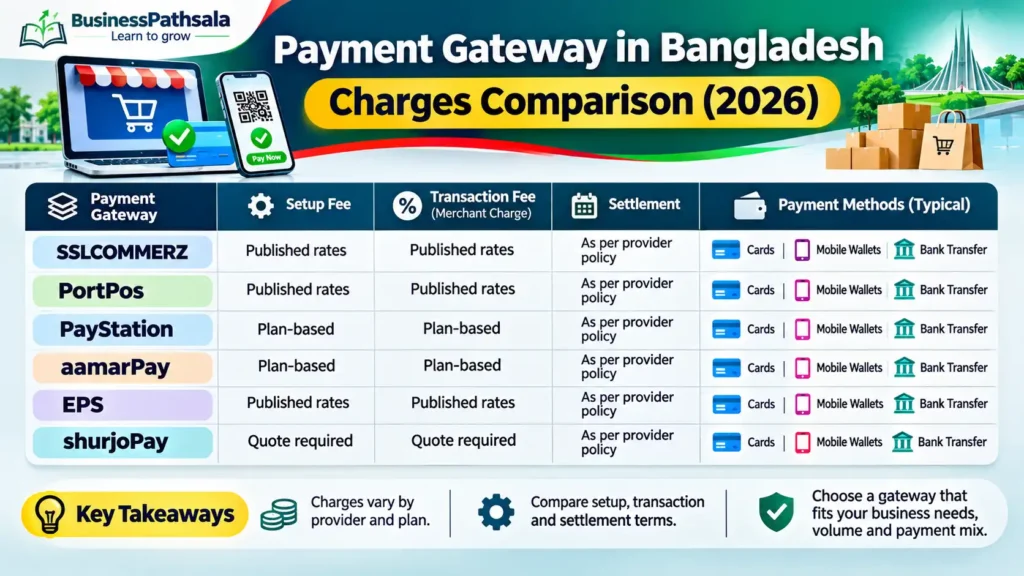
Quick answer: SSLCOMMERZ publicly lists a Basic setup fee of ৳25,500 and a 2.5% transaction fee (3.5% for AMEX). PortPos lists 2.5% for cards, 3.5% for AMEX and 2.2% for MFS and net banking, plus ৳1 per successful transaction, with no signup or monthly fee. PayStation publishes package prices and different rates by package. aamarPay’s pricing page lists plan-specific rates and says the one-time package fee is available on request; confirm the final invoice before signing. shurjoPay and EPS should be approached for a written merchant quotation.
Fees and packages can change. The figures in this guide were checked against provider pages available on 25 November 2026. Ask each provider for a dated written offer before signing.
Payment gateway charges in Bangladesh: comparison table
| Provider / plan | Setup or package fee | Published transaction charge | What to verify |
|---|---|---|---|
| SSLCOMMERZ Basic | ৳25,500 one-time, non-refundable | 2.5%; AMEX 3.5% | Settlement schedule, refund and chargeback fees, VAT/tax treatment |
| PortPos | No signup fee; no monthly fee | Cards 2.5%; AMEX 3.5%; MFS and net banking 2.2%; plus ৳1 per successful transaction | International card surcharge and any volume-based discount conditions |
| PayStation Starter | ৳1,999 | bKash 2.00%; other MFS and internet banking 1.80%; Visa/Mastercard 2.25%; AMEX 3.20% | Package settlement is weekly one day; confirm exact settlement calendar |
| PayStation Elite | ৳14,999 | bKash 1.80%; other MFS and internet banking 1.40%; Visa/Mastercard 1.90%; AMEX 3.00% | Daily settlement and whether all listed features apply to your business |
| aamarPay | One-time fee: call for price; registration invoice may vary by plan | aamarGrowth page lists cards 2.55% and MFS 2.00%; SME registration invoice may show different terms | Confirm the final plan-specific rate, eligibility and all payment channels in writing |
| EPS | One-time fee; exact amount by quotation | EPS says 1.5%–2.2%, depending on plan | Get channel-wise rate, setup fee and settlement terms |
| shurjoPay | Quotation required | Quotation required | Ask for channel-wise MDR, setup and settlement schedule |
Comparison note: These are published or registration-page figures, not a guarantee that every merchant will receive the same offer. Some providers negotiate rates by industry, monthly volume, risk profile or contract terms. A missing public price means you need a quotation; it does not mean the service is free.
1. SSLCOMMERZ charges
SSLCOMMERZ lists a Basic package at ৳25,500, marked non-refundable. Its published fee is 2.5% for each successful transaction and 3.5% for AMEX. The company says the rate applies to standard channels including Visa, Mastercard, bKash, Nagad and Rocket. The Basic package includes basic API integration and access to the merchant dashboard.
For a merchant who wants several local payment methods through one checkout, the public pricing is easy to understand. The initial fee may be a meaningful cost for a new store with low sales, however. A merchant should also confirm whether any additional integration work, refund processing, chargeback handling, international card or settlement fees apply to the proposed contract.
Official pricing: SSLCOMMERZ pricing page.
2. PortPos charges
PortWallet now operates under the PortPos name. Its business page lists 2.5% for cards other than AMEX, 3.5% for AMEX, and 2.2% for MFS and net banking. It also lists ৳1 per successful transaction. PortPos says there is no signup fee and no monthly fee. It mentions discounted merchant rates for businesses that meet qualifying monthly sales volume and maintain a good account standing.
The fixed ৳1 fee matters more when the average order value is low. For example, on a ৳100 payment, a 2.2% charge is ৳2.20; adding ৳1 makes the total ৳3.20, or 3.2% of the order. On a ৳1,000 payment, the same percentage plus ৳1 is ৳23, or 2.3%.
PortPos also states that international cards can attract an additional cross-border fee. Confirm the current amount and how it applies before accepting overseas payments.
Official details: PortPos business pricing.
3. PayStation packages and transaction rates
PayStation publishes package checkout pages with setup prices and channel-specific rates. The Starter package is listed at ৳1,999. Its displayed rates are 2.00% for bKash, 1.80% for other MFS and internet banking, 2.25% for Visa and Mastercard, and 3.20% for AMEX. The page describes weekly settlement on one day.
The Elite package is listed at ৳14,999. Its displayed rates are 1.80% for bKash, 1.40% for other MFS and internet banking, 1.90% for Visa and Mastercard, and 3.00% for AMEX. The package page lists daily settlement, EMI, international payment and payment-link features.
These figures make the package choice important. A higher upfront fee may be worthwhile for a merchant with enough monthly payment volume, but the cheaper Starter package may cost less for a new business. Compare total cost over a realistic period instead of choosing the lowest percentage in isolation. Check whether the package is available to your business category and whether any tax or optional service charge is added.
Official pages: PayStation packages and PayStation FAQ.
4. aamarPay charges
aamarPay’s pricing page lists one-time, non-refundable package fees as “Call For Price” for aamarGrowth and aamarEducation. The aamarGrowth plan is described as suitable for SMEs and growing businesses. The education plan is limited to schools, colleges and universities. The pricing page lists features such as payment links, QR payments, invoice generation, transaction alerts and a merchant portal.
The public aamarGrowth pricing page lists 2.55% for Visa and Mastercard and 2.00% for bKash, Nagad and other MFS. aamarEducation lists 1.85% for Visa and Mastercard and 1.75% for bKash, Nagad and other MFS. The registration system may show a plan-specific invoice, so confirm the exact package price and rates for your merchant account.
Official pricing: aamarPay pricing and merchant registration.
5. EPS and shurjoPay: request a written quote
EPS says its commission ranges from 1.5% to 2.2%, depending on the plan. It describes its setup cost as a competitive one-time fee and says settlement is typically weekly on two days. Its comparison page also advises merchants to contact the company for current pricing. Ask for a separate rate for cards, mobile financial services, internet banking and international transactions.
EPS lists support for Visa, Mastercard, AMEX, bKash, Nagad, Rocket, internet banking and QR payments. Its FAQ says pricing depends on transaction volume, payment methods and business requirements. This means a merchant should provide an expected monthly volume and average order value when requesting a quotation.
For shurjoPay, obtain a current written proposal. Ask for the same information you request from other providers: setup fee, channel-wise MDR, settlement cycle, refund charges, chargeback fees, supported plugins and any minimum transaction or monthly commitment. Do not rely on an old blog table or a sales conversation alone.
Official EPS pages: EPS pricing comparison and EPS services and FAQ.
How much does a payment gateway cost on a ৳1,000 order?
The following examples use the published rates above. They show the transaction charge only. They do not include package amortisation, VAT, refund costs or other contract charges.
| Provider and method | Rate used | Fee on ৳1,000 |
|---|---|---|
| SSLCOMMERZ, standard channel | 2.5% | ৳25 |
| PortPos, MFS/net banking | 2.2% + ৳1 | ৳23 |
| PortPos, card | 2.5% + ৳1 | ৳26 |
| PayStation Starter, bKash | 2.0% | ৳20 |
| PayStation Starter, Visa/Mastercard | 2.25% | ৳22.50 |
| PayStation Elite, Visa/Mastercard | 1.9% | ৳19 |
| aamarPay SME invoice example, card | 3.25% | ৳32.50 |
| aamarPay SME invoice example, listed MFS | 2.1% | ৳21 |
For a ৳1,000 order, the difference between a 2.0% fee and a 2.5% fee is ৳5. At 2,000 successful orders per month, that difference becomes ৳10,000 before considering setup fees and other costs. Use your own monthly volume to calculate the effect.
How to calculate the total monthly cost
Use this basic formula:
Monthly gateway cost = setup/package fee allocation + transaction fees + fixed per-transaction fees + other contract charges.
For a fair comparison, calculate the setup fee over the period you expect to use the gateway. If a ৳12,000 setup fee is spread over 12 months, its monthly allocation is ৳1,000. This is a budgeting method, not a charge the provider necessarily bills every month.
Example: a store processes 500 successful orders per month with an average order value of ৳1,200. Monthly payment volume is ৳600,000. At 2.5%, the percentage fee is ৳15,000. If the provider also charges ৳1 per transaction, add ৳500. Then add the monthly share of the setup fee and any applicable extras. This calculation helps compare offers on equal terms.
Which payment gateway is suitable for your business?
New online store with limited sales
Look closely at upfront cost and monthly commitment. PortPos lists no signup or monthly fee, while PayStation Starter lists ৳1,999. SSLCOMMERZ Basic has a higher published setup fee of ৳25,500. Compare the total cost for your expected sales, not the brand name alone.
Growing e-commerce business
Compare payment success rates, supported banks and wallets, settlement timing, plugin reliability and support response. A small rate reduction can matter at high volume, but a checkout outage or poor reconciliation process can cost more than the fee difference.
Facebook-based seller or service provider
Payment links, QR collection and invoice tools may be more useful than a full website integration. Ask whether the provider supports your business model and what evidence of business registration it requires.
Education institution
Ask about institution-specific plans, bulk collections, student IDs or invoice references, reconciliation reports and refunds. aamarPay lists a dedicated education package, while EPS describes education as one of its supported sectors. Confirm eligibility and the complete rate schedule.
Business receiving overseas card payments
Ask about international card acceptance, currency conversion, cross-border fees, settlement currency, foreign exchange documentation and any additional approval requirements. A provider that supports local cards may not automatically support every international payment scenario.
Documents usually requested for merchant onboarding
Requirements vary by provider and legal structure. Prepare the documents that apply to your business and ask for the provider’s latest checklist before applying. These may include:
- Updated trade licence.
- Owner’s or authorised signatory’s NID or passport.
- e-TIN certificate and business bank account details.
- Certificate of incorporation and relevant company documents for a limited company.
- Partnership deed for a partnership business.
- Website or Facebook page URL, product details, refund policy and contact information.
- Additional approvals for regulated, educational, charitable or specialised activities where applicable.
aamarPay’s registration page, for example, asks for business identity, contact details, website information and supporting documents. Its form shows that document requirements depend on the entity type. Do not assume that a personal wallet account is equivalent to an approved merchant gateway account.
What to check before signing a payment gateway contract
- Channel-wise rates: Get separate MDR figures for Visa, Mastercard, AMEX, bKash, Nagad, Rocket, other MFS and internet banking.
- All upfront costs: Confirm setup, onboarding, integration, annual renewal and package charges. Ask whether each amount is refundable.
- Settlement: Confirm whether funds arrive daily, weekly or after a fixed number of business days. Ask how weekends and public holidays affect payout.
- Refunds and chargebacks: Ask whether the original transaction fee is returned, whether a refund fee applies and who bears chargeback costs.
- Fixed fees and taxes: Check per-transaction charges, VAT, withholding tax treatment and any bank transfer costs.
- Integration: Confirm compatibility with WooCommerce, Shopify, custom PHP, Laravel, mobile apps or your actual platform. Ask for sandbox access and documentation.
- Security and support: Ask about PCI DSS scope, fraud monitoring, dispute handling, incident response and support availability.
- Exit terms: Check contract duration, termination notice, reserve or holdback terms and the process for withdrawing unsettled funds.
Bangladesh Bank rules and merchant charges
Bangladesh Bank’s payment-system framework distinguishes Payment System Operators (PSOs) and Payment Service Providers (PSPs). The central bank’s annual report explains that PSOs can provide merchant aggregation, merchant acquiring, payment gateway and switching solutions, while PSPs generally provide payment services such as e-wallets. The report for 2024–2025 says 11 PSOs and 9 PSPs were fully operational at that time.
Merchants should verify the provider’s current regulatory status and the specific entity named in the contract. A brand name, payment logo or claim on a website is not a substitute for checking the licensed legal entity and the service it is authorised to provide.
Bangladesh Bank sources: Annual Report 2024–2025, Payment and Settlement Systems and PSO/PSP approval procedure.
Frequently asked questions
Which payment gateway has the lowest charges in Bangladesh?
There is no single lowest-cost option for every merchant. PayStation Elite publishes low rates for some channels but has a ৳14,999 package fee. PortPos has no signup or monthly fee but adds ৳1 per successful transaction. Your payment mix, average order value and monthly volume determine the actual cost.
How much does SSLCOMMERZ charge?
Its published Basic plan costs ৳25,500 one time and is non-refundable. The transaction fee is 2.5% for standard channels and 3.5% for AMEX, according to its pricing page.
Does PortPos have a monthly fee?
PortPos says it has no signup fee and no monthly fee. It lists a ৳1 charge per successful transaction in addition to its percentage rate.
Does aamarPay charge a setup fee?
Its pricing page lists one-time fees as “Call For Price” for aamarGrowth and aamarEducation. The published rates differ by plan. Confirm the current invoice and channel-wise rates before registration.
Can a small business use a payment gateway without a website?
Some providers offer payment links, QR payments or invoice collection that may work for a Facebook seller or service business. Ask whether the provider accepts your business model and what public business information or documents it requires.
How long does payment gateway settlement take?
It depends on the provider, package, payment channel, bank and contract. PayStation’s Starter page lists weekly settlement on one day, while its Elite page lists daily settlement. EPS describes typical weekly settlement on two days. Confirm cut-off times, holidays and exceptions in writing.
Are payment gateway charges refundable when a customer gets a refund?
Do not assume the transaction fee will be returned. Refund handling differs by provider and payment method. Ask for the refund policy, any refund processing fee and the time required for the customer’s money to return.
Can I use a Bangladesh payment gateway with WooCommerce?
Several local providers offer website integrations or developer APIs, and PayStation lists a WordPress plugin in its resources. Confirm that the plugin is maintained, compatible with your WooCommerce version and supports the payment channels you need. Test the complete checkout and refund flow in a sandbox before going live.
What is MDR in payment gateway pricing?
MDR means Merchant Discount Rate. It is the percentage charged to a merchant for processing a payment. A gateway may also add a fixed fee, setup cost or other charges, so MDR alone does not show the full cost.
Final checklist
Before selecting a provider, compare the total cost for your expected monthly payment volume. Get the exact rate for every payment method your customers use. Confirm settlement, refunds, chargebacks, tax treatment and technical support in writing. Then test checkout, payment confirmation, failed payments and refunds before accepting live orders.
For more Bangladesh business guidance, read our guides on how to start a business in Bangladesh, online trade licence in Bangladesh, and earning money online in Bangladesh.
Disclaimer: This article is for general business information. Provider prices and terms may change. Confirm the current written offer and regulatory details directly with the provider before making a decision.
 n
How payment processing works after a customer clicks Pay
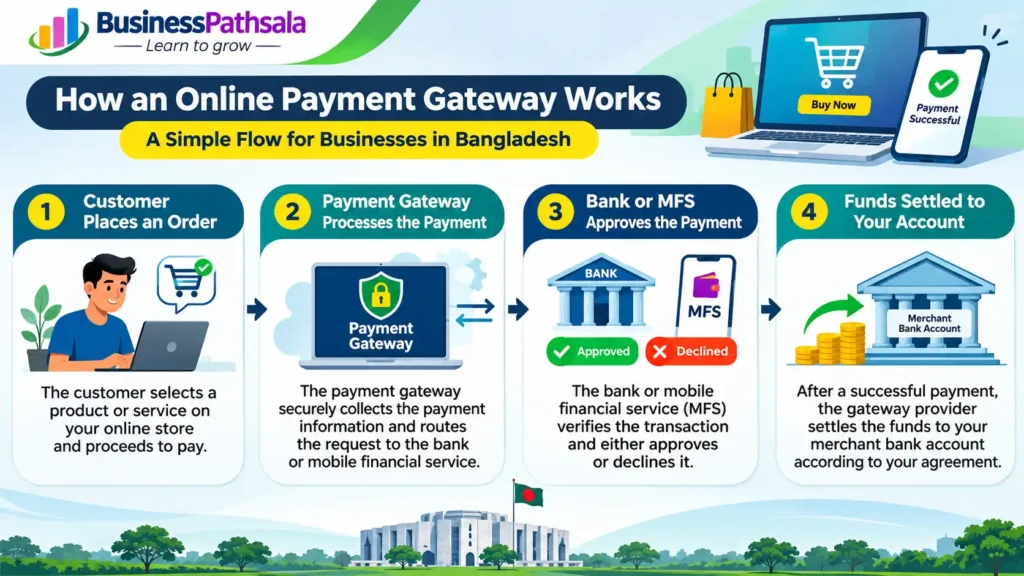
A typical online payment passes through several parties. The customer chooses a payment method on the checkout page. The gateway sends the payment request to the relevant bank, card network or mobile financial service. The issuer or wallet provider approves or declines it, and the gateway sends the result back to the merchant’s website. After successful processing, the provider settles the merchant’s funds according to the agreed schedule.
This process explains why a payment gateway may have different rates for cards, wallets and internet banking. Each payment method can involve different acquiring arrangements, network costs and operational requirements. A merchant should therefore compare like with like. A card rate should not be compared with a bKash rate as if they were the same service.
Also test the website’s order-status handling. A customer may close the browser after paying, or a network interruption may delay the confirmation message. Your store should use the gateway’s server-to-server notification or verification process before marking an order as paid. Do not rely only on the customer returning to a success page.
Settlement time and cash flow
Settlement is the transfer of collected payment funds to the merchant’s nominated bank account. It can happen on a daily, weekly or other agreed schedule. The published package information from PayStation and EPS gives examples of different schedules, but the merchant agreement controls the actual payout rules for an account.
Ask whether settlement is calculated from transaction time, the end of a business day or a provider’s cut-off time. Confirm whether Friday, Saturday and public holidays change the payout date. If a provider holds funds for review, ask what triggers the review, how long it can last and what documents may be required.
Cash flow planning should account for the delay between a customer paying and the money reaching the bank. A shop that pays suppliers every morning may need a different settlement arrangement from a digital service that has few immediate operating costs. If fast payout is important, include settlement speed in the comparison rather than focusing only on the percentage fee.
Payment gateway versus direct merchant payments
A gateway combines payment methods into a checkout or payment collection service. A direct merchant arrangement with a bank or mobile financial service may be suitable when most customers use one channel. The right choice depends on the audience and how orders are managed.
For example, a neighbourhood shop whose customers mainly pay through one mobile wallet may start with a merchant account and a manual reconciliation process. A national online store may need cards, multiple wallets and internet banking in one checkout. A direct wallet option can have a lower headline fee, but the merchant must consider the work involved in checking payments, matching transaction references, handling partial payments and issuing refunds.
Manual collection also creates operational risks. Staff may misread a transaction ID, accept an edited screenshot or mark an order paid before funds arrive. Use the official merchant app or statement to verify every payment. For a larger store, automated gateway notifications and reconciliation reports can reduce manual errors.
How to compare offers using your own sales mix
Ask the provider to quote based on your actual sales. Estimate the percentage of transactions paid by cards, bKash, Nagad, Rocket and internet banking. Then calculate the fee for each channel separately. If a provider quotes one blended rate, ask how that rate is calculated and whether it can change when your payment mix changes.
Consider this example. A merchant receives ৳500,000 per month: 50% through cards, 35% through bKash and 15% through other MFS or internet banking. Apply each provider’s quoted rate to the relevant share. Add any fixed charge per successful payment using the expected transaction count. Finally, add the monthly share of the setup fee and any recurring costs. This gives a more useful estimate than multiplying all sales by a single headline rate.
Keep a spreadsheet with the provider name, channel rate, setup fee, fixed fee, settlement time, refund rule and the date the quote was received. Ask for a revised quote if the offer expires. Save the final rate card and contract with your accounting records so the finance team can check deductions against settlements.
Security and customer experience checks
Before going live, check that the checkout uses HTTPS and that sensitive card data is handled through the provider’s approved flow. Ask the provider what security responsibilities remain with your business. PCI DSS obligations depend on how the payment page and card data are handled; a gateway’s certification does not automatically make every part of a merchant’s website compliant.
Run test transactions for successful, failed, cancelled and pending payments. Test on a low-cost order and confirm that the order status, receipt, inventory and email notification all update correctly. Check whether the checkout works on common Android phones and slower mobile connections. A payment method appearing on a provider’s website does not prove that it is enabled for your merchant account.
Make your refund and cancellation policy easy to find before checkout. Customers should know how to contact the business if a payment succeeds but an order confirmation does not arrive. Keep transaction references and settlement reports so you can investigate a dispute without asking customers to send sensitive card details.
Questions to send to each provider
Use the same questions with every sales team so the replies are comparable:
- What are the current rates for Visa, Mastercard, AMEX, bKash, Nagad, Rocket and internet banking?
- Are there setup, annual, monthly, minimum-volume or per-transaction charges?
- Is VAT included in the quoted price, and what tax documents will be provided?
- When are funds settled, and what happens on weekends and public holidays?
- What are the refund, reversal and chargeback fees?
- Are international cards enabled, and are there currency conversion or cross-border charges?
- Which WooCommerce plugin, API, SDK and sandbox are supported?
- Can you provide a sample settlement report and a copy of the merchant agreement before onboarding?
- What is the process for complaints, technical incidents and account termination?
Ask the provider to answer by email or on an official quotation. A verbal promise may be difficult to verify if the amount deducted from a settlement later differs from what you expected.