
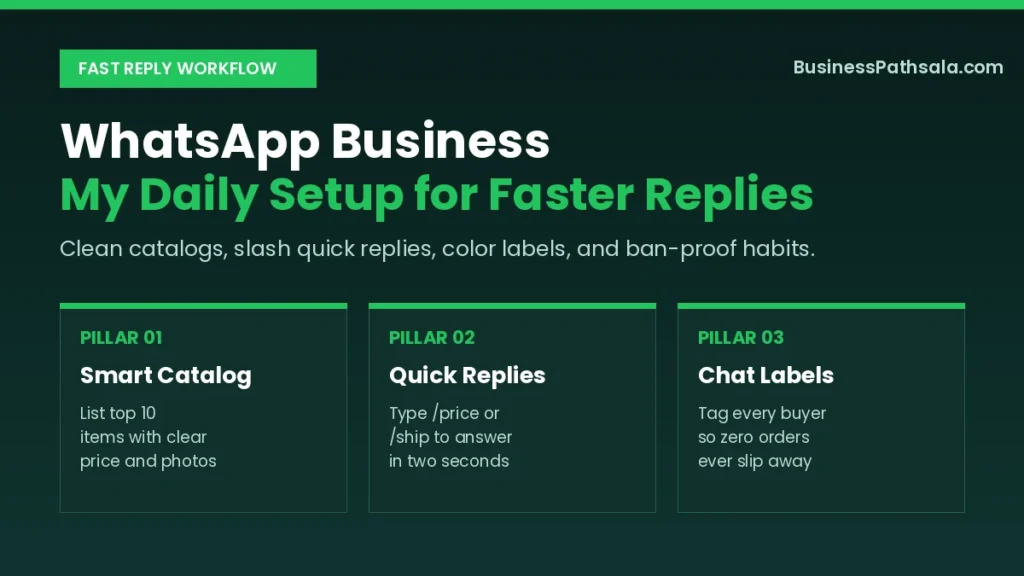
Two years ago, I answered customer orders on my personal chat app between family dinner texts. I lost three paid orders in one week simply because hot buyer chats sank below group memes. Switching to WhatsApp Business cleaned up my inbox in one afternoon and doubled my reply speed.
Most owners download the app, upload a logo, and stop right there. I did the same thing for my first two months. Once I wired up catalogs, slash shortcuts, and four color labels, my phone stopped feeling like a noisy trap.
What Most Guides Leave Out About WhatsApp Business
The free app is built for fast one-on-one trust, not mass cold spamming. Many tutorials tell you to blast promo broadcasts to five hundred strangers on day one. I tried a small cold broadcast once and got a warning lock inside six hours.
Another detail guides skip is chat backup before switching numbers. If you move your main SIM without running a fresh cloud backup, years of supplier prices vanish in seconds. Always hit back up before touching the business app.
My Hard Lesson: Broadcast lists only reach people who have saved your phone number. Ask every new buyer to save your shop number right after their first hello.
| My Early Mistake | What Happened | What I Do Now |
|---|---|---|
| Skipped cloud backup | Lost old vendor chats | Back up before switching |
| Sent cold promo blasts | Account got flagged fast | Message opted-in buyers only |
| No away message set | Night leads went cold | Set friendly after-hours note |
| Typed prices by hand | Wasted an hour daily | Use slash quick replies |
Tools & Supplies I Actually Use
You only need a dedicated SIM, the free app, and a laptop browser for heavy chat days. Fancy third-party chatbot plugins promise magic, yet they often confuse local buyers with stiff menus. Keep your setup lean until you cross fifty chats a day.
Here is my exact desk setup for smooth daily replies:
- A separate business SIM: Keeps personal family calls away from late-night price checks.
- The official free app: Download directly from the WhatsApp Business official site.
- WhatsApp Web on desktop: Typing full order confirmations on a real keyboard cuts errors in half.
- Clean square product shots: Keep ten crisp 1080×1080 photos saved in one phone folder.
| Option I Tried | Best Use Case | My Honest Verdict |
|---|---|---|
| Free Business App | Solo owners and small teams | More than enough to start |
| WhatsApp Web desktop | High-volume afternoon replies | Saves my thumbs daily |
| Paid Business API | Large brands with 500+ chats | Overkill for small shops |
| Unofficial bulk senders | None—risks permanent ban | Never install these tools |
My Step-by-Step WhatsApp Business Workflow
Build your profile, catalog, and automated greetings in thirty focused minutes before sharing your link. A half-empty profile looks like a temporary side hustle. Follow these three clean phases in order.
Phase 1: Prep Your Number and Profile Details
Verify a clean business number and match your exact address, hours, and website link. Upload a sharp logo that stays readable inside a tiny circle icon. Write a one-line bio stating what you sell and how fast you ship.
Match your exact shop hours and phone number with your Google Business Profile so local buyers see consistent details everywhere. Consistency builds quiet confidence before a customer even types “hello.”
Phase 2: Build Your WhatsApp Business Catalog and Replies
Add your top ten best-selling items with clear prices, sizes, and short notes. Buyers hate typing “price please” ten times in a row. When your catalog sits right inside the chat screen, shoppers tap items and send you a clean cart.
Next, set up five core slash shortcuts inside Business Tools:
/price— Your clear price range and bundle offer./ship— Delivery time, courier fee, and cash-on-delivery rules./pay— Your exact bKash, Nagad, or bank transfer details./loc— Your shop landmark and Google Maps pin link./thanks— A warm thank-you note plus your review link.
Speed Win: Typing
/payinstead of hunting for my account number saved me forty minutes every busy afternoon and stopped typo mistakes.
Phase 3: Turn On Smart Greeting and Away Messages
Set a friendly greeting for first-time chats and a clear away note after closing time. Keep your greeting under two short lines so it feels human, not robotic. Tell the buyer when you will reply and invite them to browse your catalog meanwhile.
| Step | Time Needed | Key Shortcut |
|---|---|---|
| Profile & hours setup | 8 minutes | Copy bio from Facebook |
| Upload top 10 items | 12 minutes | Use bright daylight shots |
| Write 5 quick replies | 6 minutes | Start with /price and /ship |
| Configure away message | 4 minutes | Schedule outside open hours |
Shortcuts That Cut My Reply Time in Half
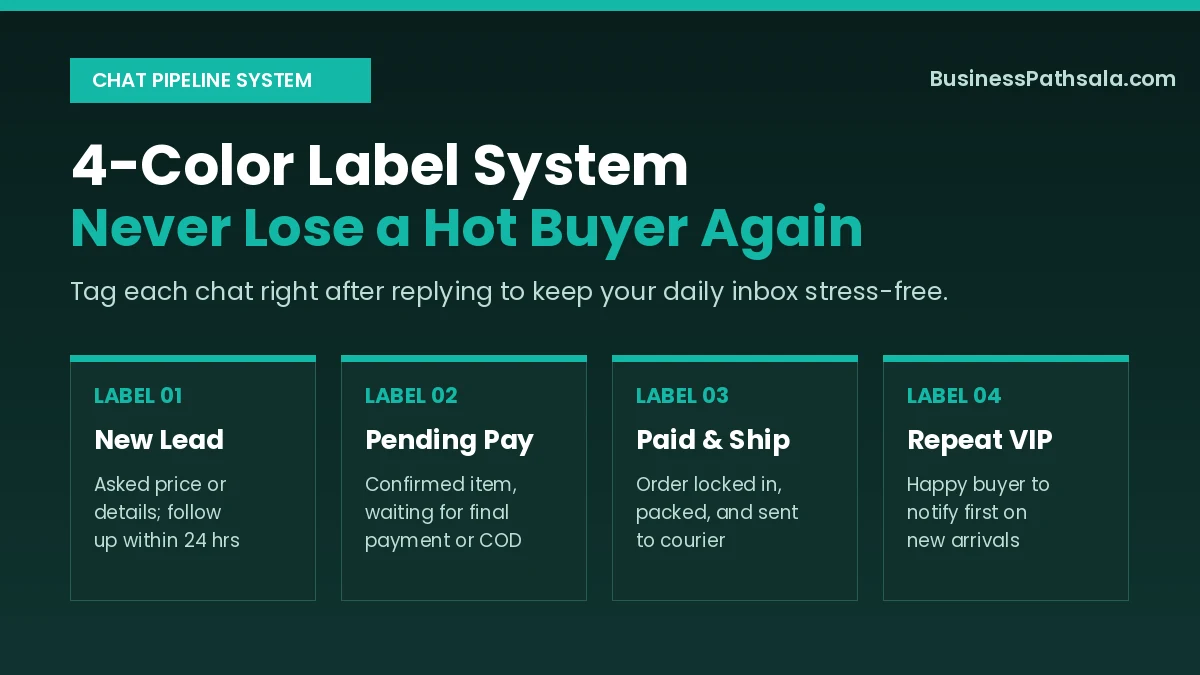
Color labels and a short click-to-chat link turn messy chats into a calm sales pipeline. Before using labels, I scrolled past forty chats every evening trying to remember who still owed payment. Now one quick tap shows every unpaid order in three seconds.
Pair your click-to-chat link (wa.me/yournumber) with your SME marketing strategy so social followers land directly inside your inbox. You can also explore using AI for business growth to draft warmer reply scripts in minutes.
- Pin your top 3 active orders: Keep urgent dispatches glued to the top of your screen.
- Use voice notes for complex fixes: A fifteen-second warm voice note resolves confusion faster than three paragraphs.
- Post two Status updates daily: Show real packing clips or fresh arrivals to stay top of mind without spamming chats.
Status Secret: My best repeat sales come from 10-second Status clips of freshly packed parcels. Warm buyers reply straight to the clip asking for the same item.
Where Things Usually Go Wrong
Aggressive cold messaging, stale catalog prices, and ignored labels cause almost every headache. Always respect the WhatsApp Business messaging policy so your main sales number stays safe long term.
Here is my quick diagnostic table whenever chat flow slows down:
| Warning Sign | Real Cause | My 2-Minute Fix |
|---|---|---|
| Temporary account ban | Too many unsaved blasts | Stop cold lists, appeal politely |
| Buyers vanish after price | No product photos attached | Send catalog card, not plain text |
| Missed order dispatches | Forgot to tag paid chats | Apply “Paid & Ship” immediately |
| Angry late-night buyers | Away message turned off | Sync away note to shop hours |
My Weekly Maintenance Habit
Spend ten minutes every Sunday night clearing old labels and refreshing your catalog. An outdated catalog with sold-out items frustrates buyers fast. A tiny weekly reset keeps your inbox sharp all month.
| Weekly Task | Exact Amount | How Often |
|---|---|---|
| Hide sold-out items | Full catalog scan | Every Sunday |
| Follow up “New Leads” | 5 to 10 warm chats | Every Tuesday |
| Archive closed orders | All delivered chats | Every Friday |
| Update quick replies | Check fees and offers | Once per month |
Following up politely with five “New Lead” chats every Tuesday recovers sales that would otherwise go cold. One gentle line—”Still need help with sizing?”—often closes two extra orders in ten minutes.
FAQs for WhatsApp Business
Is the WhatsApp Business app free to download?
Yes, the WhatsApp Business app is completely free on Android and iPhone. Only the large-scale WhatsApp Business Platform API charges per message.
Can I use personal WhatsApp and WhatsApp Business on one phone?
Yes, both apps run side by side on one dual-SIM phone. You simply need two separate phone numbers to register each account.
Will I lose old chats when switching to WhatsApp Business?
No, back up your chats to Google Drive or iCloud first. The business app imports your full message history during setup.
How many devices can connect to one WhatsApp Business account?
The free app links up to four companion devices alongside your main phone. That lets small teams reply smoothly from laptops.
Why do WhatsApp Business accounts get banned suddenly?
Most bans happen from cold bulk blasts to unsaved numbers. Only message people who opted in and saved your business contact.
Your 5-Minute WhatsApp Upgrade Today
My biggest takeaway after running daily orders on this app is simple: speed and clarity beat fancy automation. When buyers get a warm, accurate reply in under two minutes, they rarely bother messaging a second shop. Expect smoother days immediately and steadier repeat orders within thirty days.
Take five minutes right now to create just three quick replies—/price, /ship, and /pay—inside your Business Tools menu. Use them on your very next customer inquiry today.

